
Additional Options (Ellipsis)
Several options are available under the ellipsis at the top of the Turnboard.
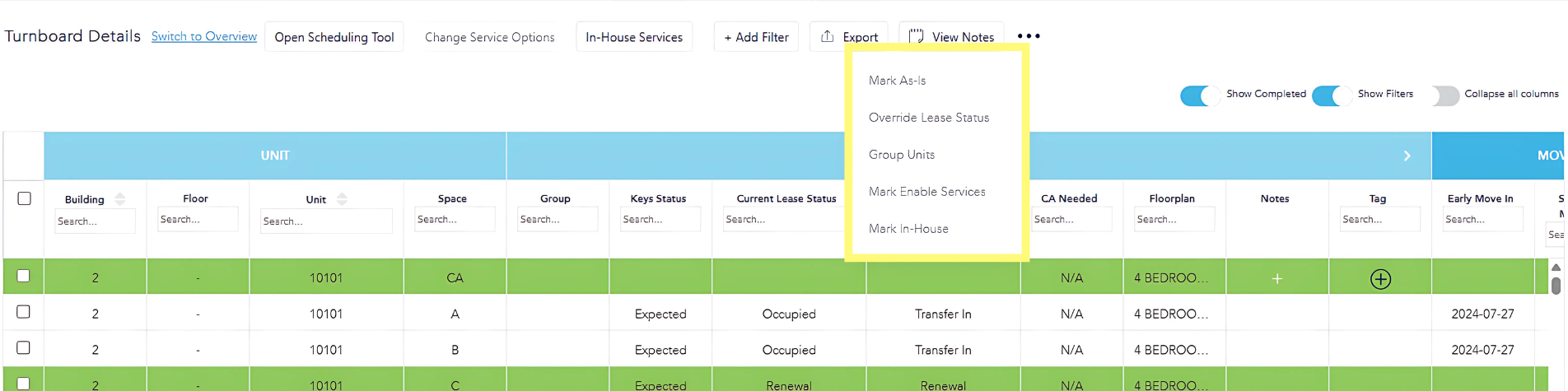
First. select the space(s) you wish to adjust, then click the ellipsis to select available options from the following:
- Mark As-Is: Labels selected space(s) As-Is and removes them from the workflow.
- Override Lease Status: To be used for the exception to lease data sync when the status of a space has not synced as expected and an override is required to move forward accurately with work to be completed.
- Group Units: Grouping units allows for groups of units to be moved through the workflow together. You may sort service tabs by group to select and progress as a collective unit.
- Mark Enable Services: For spaces that would not traditionally be turned (i.e. renewed spaces or common areas in partially occupied units), enabling services opens the spaces up to have work assigned to them.